What is Docker? A Beginner's Guide to Containerization
In the rapidly evolving landscape of software development, understanding What is Docker? A Beginner's Guide to Containerization is crucial for modern tech professionals. This beginner's guide delves deep into What is Docker? A Beginner's Guide to Containerization, a revolutionary platform that has redefined how applications are built, shipped, and run. By isolating applications into self-contained units, Docker addresses many traditional deployment challenges, paving the way for more efficient and scalable systems. Join us as we explore the core concepts and practical benefits of this transformative technology, providing a comprehensive overview for tech enthusiasts seeking depth and practical insights.
- Understanding What is Docker? A Paradigm Shift in Application Deployment
- The Inner Workings of Docker: How Containerization Transforms Development
- Key Features and Benefits of Docker
- Real-World Applications and Use Cases
- Orchestration: Managing Containers at Scale
- Potential Challenges and Considerations
- The Future Outlook for Docker and Containerization
- Conclusion
- Frequently Asked Questions
- Further Reading & Resources
Understanding What is Docker? A Paradigm Shift in Application Deployment
Before Docker, deploying applications was often a complex and error-prone process. Developers would meticulously set up environments on their machines, only for the application to behave differently – or not at all – when moved to a testing or production server. This notorious "it works on my machine" syndrome highlighted a fundamental problem: inconsistencies between development, staging, and production environments. This is precisely the problem Docker was engineered to solve.
Docker, at its core, is an open-source platform that automates the deployment, scaling, and management of applications using containerization. It packages an application and all its dependencies (libraries, frameworks, configuration files, etc.) into a standardized unit called a container. This ensures that the application runs consistently across any environment, from a developer's laptop to an on-premise data center or the cloud.
The Problem Docker Solves: "Works on My Machine" Syndrome
Traditional application deployment often involved a tightly coupled relationship between the application code and the underlying operating system and hardware. Each environment – development, testing, staging, and production – might have slight variations in library versions, system configurations, or even OS distributions. These subtle differences often led to unexpected bugs, deployment failures, and significant delays as teams struggled to replicate issues across environments.
Imagine a scenario where a developer builds an application using a specific version of a programming language runtime and a set of libraries. When this application is handed off to the operations team for deployment, they might install it on a server with different versions of those dependencies. The result is often hours or even days spent debugging environmental conflicts rather than actual code issues. Docker provides a robust solution to this pervasive problem by creating isolated, portable environments.
Docker vs. Virtual Machines: A Crucial Distinction
To truly grasp the innovation of Docker, it's essential to understand how it differs from traditional virtual machines (VMs). Both aim to isolate environments, but they do so at different levels, leading to significant differences in efficiency and resource utilization.
Virtual Machines (VMs):
- Hypervisor Layer: VMs run on a hypervisor (e.g., VMware, VirtualBox, Hyper-V) that virtualizes the hardware.
- Guest OS: Each VM includes a full-fledged guest operating system (e.g., Windows, Linux distribution) on top of the virtualized hardware.
- Resource Heavy: Because each VM carries its own OS, they are significantly larger in size (often gigabytes) and require more CPU, memory, and storage resources.
- Slower Boot Times: Booting a VM involves starting an entire operating system, which can take minutes.
- Isolation: VMs offer strong isolation at the OS level.
Docker Containers:
- Docker Engine: Containers run on top of the host operating system's kernel, managed by the Docker Engine.
- Shared Host OS Kernel: Containers do not include a full guest OS. Instead, they share the host OS kernel.
- Lightweight: Containers are much smaller (often megabytes) because they only bundle the application and its dependencies, not an entire OS.
- Faster Boot Times: Containers can start up in seconds, as they don't need to boot an entire operating system.
- Isolation: Containers provide process-level isolation, making them very efficient for running multiple applications on a single host.
The key takeaway is that VMs virtualize the hardware, while Docker containers virtualize the operating system. This fundamental difference makes containers far more efficient, portable, and faster to deploy.
The Inner Workings of Docker: How Containerization Transforms Development
Docker's magic lies in its architecture and the interplay of several core components. Understanding these elements is key to leveraging the platform effectively.
The Analogy of Shipping Containers
Perhaps the best analogy for Docker is the intermodal shipping container. Before standardized shipping containers, goods were loaded and unloaded piece by piece, a slow, inefficient, and often damaging process. With the advent of shipping containers, any type of good – electronics, clothing, food – can be placed into a standardized box. This box can then be moved seamlessly by truck, train, or ship, regardless of its contents, because the infrastructure (cranes, ports, trucks) is built to handle the container, not the individual goods inside.
Similarly, Docker containers standardize the packaging of software. Your application, along with everything it needs, goes into a "Docker container." This container can then be "shipped" and run on any machine that has the "Docker Engine" installed, without worrying about environmental discrepancies.
Core Components of the Docker Ecosystem
The Docker ecosystem is built upon several interconnected components that work in harmony to facilitate containerization.
Dockerfile: The Blueprint for Your Application
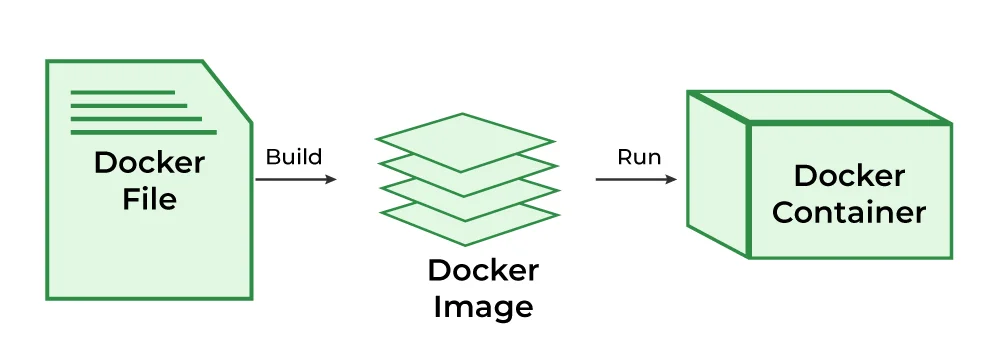
A Dockerfile is a simple text file that contains a set of instructions for building a Docker image. It's essentially a script that tells Docker how to assemble your application's environment, step by step. Each instruction in the Dockerfile creates a layer in the image, promoting efficiency and reusability.
Example Dockerfile Snippet:
# Use an official Node.js runtime as a parent image
FROM node:14

# Set the working directory in the container
WORKDIR /usr/src/app

# Copy package.json and package-lock.json to the working directory
COPY package*.json ./

# Install application dependencies
RUN npm install

# Copy the rest of the application source code
COPY . .

# Expose port 8080 to the outside world
EXPOSE 8080

# Define the command to run when the container starts
CMD [ "node", "server.js" ]
This Dockerfile specifies using Node.js 14, setting a working directory, copying dependencies, installing them, copying the rest of the code, exposing a port, and finally defining the command to execute when a container starts from this image.
Docker Image: The Immutable Snapshot
A Docker image is a lightweight, standalone, executable package that includes everything needed to run a piece of software: the code, a runtime, system tools, libraries, and settings. Images are built from Dockerfiles and are immutable, meaning once created, they cannot be changed. This immutability is crucial for consistency and predictability.
Think of an image as a blueprint or a template. When you build an image, you're essentially creating a static snapshot of your application's entire environment at a specific point in time. Images are versioned, allowing you to roll back to previous stable versions if needed.
Docker Container: The Running Instance
A Docker container is a runnable instance of a Docker image. When you run an image, Docker creates a container, which is a live, isolated environment where your application executes. Containers leverage the host OS kernel but operate in their own isolated user space, complete with their own filesystem, network interfaces, and process space.
Multiple containers can run on the same host machine simultaneously, each isolated from the others. This isolation prevents conflicts between applications and ensures that an issue in one container doesn't affect others. Containers can be started, stopped, moved, and deleted with ease, making them incredibly flexible.
Docker Engine: The Runtime Environment
The Docker Engine is the core runtime that builds and runs Docker containers. It consists of three main components:
- Docker Daemon (dockerd): A background service that runs on the host machine. It manages Docker objects like images, containers, networks, and volumes. The daemon listens for Docker API requests and processes them.
- Docker CLI (docker): The command-line interface tool that allows users to interact with the Docker Daemon, employing commands like
docker build,docker run,docker pull, anddocker pushto manage their containers, much like how developers utilize various tools and techniques, including AI for coding, to streamline their development workflows. - REST API: A RESTful API that the CLI or other tools can use to communicate with the Docker Daemon.
Docker Registry (Docker Hub): The Central Repository
A Docker Registry is a service that stores and distributes Docker images. The most well-known public registry is Docker Hub. It hosts millions of images, both official images provided by vendors (like nginx, node, ubuntu) and user-contributed images.
Registries allow developers to:
- Pull images: Download existing images to their local machine.
- Push images: Upload their custom-built images for others to use or for deployment.
- Share images: Collaborate and distribute application environments across teams and organizations.
Many organizations also use private Docker registries to store proprietary images securely within their infrastructure.
Key Features and Benefits of Docker
Docker's architectural choices and component interactions yield a powerful set of features that deliver significant benefits across the software development lifecycle.
Portability and Consistency
One of Docker's most compelling advantages is its unparalleled portability. A Docker container can run identically on any system that has the Docker Engine installed, regardless of the underlying infrastructure. This means an application developed on a MacBook can run flawlessly on a Linux server in the cloud or a Windows machine on a developer's desktop, eliminating environment-specific bugs.
This consistency extends to deployment as well. Once a container image is built and tested, you can be confident it will behave the same way in production, drastically reducing deployment risks and "it works on my machine" scenarios.
Resource Efficiency
As discussed, containers share the host OS kernel, making them significantly more lightweight than VMs. This efficiency means you can run many more containers on a single host machine compared to VMs, leading to better utilization of hardware resources. For enterprises, this translates directly into reduced infrastructure costs, as fewer servers are needed to host the same number of applications.
Data from the Cloud Native Computing Foundation (CNCF) suggests that companies leveraging containerization often see up to 70% better server utilization compared to traditional VM deployments, directly impacting operational expenditures.
Application Isolation
Each Docker container runs in its own isolated environment. This isolation prevents conflicts between applications, even if they rely on different versions of the same library or framework. If one container crashes, it doesn't affect other containers running on the same host. This enhances security, stability, and makes debugging much simpler.
For example, you could run two different versions of a Node.js application, each requiring a distinct Node.js runtime version, on the same host machine without any conflicts, all thanks to containerization.
Faster Deployment and Scaling
Docker streamlines the deployment process significantly. Since containers are self-contained and lightweight, they can be started and stopped in seconds. This speed is invaluable for continuous integration/continuous deployment (CI/CD) pipelines, enabling faster feedback loops and more frequent software releases.
When demand for an application increases, new instances of its container can be spun up rapidly to handle the load. Similarly, when demand subsides, containers can be scaled down just as quickly, optimizing resource usage and cost. This dynamic scalability is a cornerstone of modern cloud-native architectures.
Simplified CI/CD Pipelines
Continuous Integration and Continuous Delivery (CI/CD) pipelines are revolutionized by Docker. Containers provide a consistent environment across the entire pipeline, from development to testing, staging, and production. Developers can build a Docker image once, and that exact same image can be used throughout all stages.
This eliminates environmental discrepancies as a source of failure, leading to more reliable builds and deployments. Tools like Jenkins, GitLab CI/CD, and GitHub Actions integrate seamlessly with Docker, allowing for automated image building, testing, and pushing to registries.
Real-World Applications and Use Cases
Docker's versatility has led to its widespread adoption across various industries and use cases, fundamentally changing how software is developed and operated.
Microservices Architecture
Docker is almost synonymous with microservices. In a microservices architecture, large applications are broken down into smaller, independent services that communicate with each other. Each microservice can be developed, deployed, and scaled independently.
Containers provide the ideal packaging mechanism for these individual services. Each microservice can run in its own Docker container, with its own dependencies, technology stack, and scaling requirements, allowing for greater agility and resilience in complex systems.
Continuous Integration and Continuous Delivery (CI/CD)
As mentioned, Docker greatly simplifies CI/CD. Development teams can ensure that the testing environment precisely mirrors the production environment, catching compatibility issues earlier in the development cycle. Automated build processes create Docker images, run tests within containers, and then push tested images to a registry, ready for deployment. This accelerates release cycles and improves software quality.
According to a survey by GitLab, teams using containers are 2.5 times more likely to deploy software multiple times a day, highlighting the impact on release frequency.
Local Development Environments
Developers often spend significant time setting up their local machines to match production environments, a tedious and error-prone process. Docker allows developers to define their entire development stack (database, message queues, web server, application runtime) as a collection of containers.
This "development environment as code" approach ensures that every developer on a team is working with the exact same dependencies and configurations, reducing onboarding time and "it works on my machine" issues for local development. Tools like Docker Compose further simplify managing multi-container local setups.
Cloud and Hybrid Cloud Deployments
Docker containers are cloud-agnostic. They can run on any cloud provider (AWS, Azure, Google Cloud, etc.) or on-premise infrastructure with Docker Engine installed. This portability enables organizations to adopt hybrid cloud strategies, moving workloads seamlessly between different environments without re-platforming or refactoring.
Major cloud providers offer managed container services (e.g., AWS ECS/EKS, Azure Kubernetes Service, Google Kubernetes Engine) that simplify running and scaling Docker containers at scale, indicating the deep integration of Docker into cloud computing.
Legacy Application Modernization
Many organizations have monolithic legacy applications that are difficult to update, scale, or migrate to the cloud. Docker offers a pathway to modernize these applications without a complete rewrite. By "containerizing" a legacy application, teams can isolate it from its underlying infrastructure, making it more portable and easier to manage.
While not a complete microservices refactoring, containerizing a monolith can be the first step towards breaking it down or at least improving its deployment and scalability, giving older applications a new lease of life.
Orchestration: Managing Containers at Scale
While Docker is excellent for running individual containers, managing hundreds or thousands of containers across multiple host machines requires an orchestration platform. Container orchestration automates the deployment, scaling, networking, and availability of containerized applications.
Docker Compose: Multi-Container Local Development
For applications composed of several services (e.g., a web application, a database, and a caching layer), Docker Compose helps define and run multi-container Docker applications. You use a YAML file to configure your application's services, networks, and volumes. With a single command (docker-compose up), Compose brings up all the defined services, simplifying complex local development setups.
version: '3.8'
services:
  web:
    build: .
    ports:
      - "80:80"
    depends_on:
      - db
  db:
    image: postgres:13
    environment:
      POSTGRES_DB: mydatabase
      POSTGRES_USER: user
      POSTGRES_PASSWORD: password
    volumes:
      - db-data:/var/lib/postgresql/data

volumes:
  db-data:
This docker-compose.yml file defines a simple web application and a PostgreSQL database.
Kubernetes: The De Facto Standard for Production Orchestration
Kubernetes (often abbreviated as K8s) has emerged as the leading platform for orchestrating containers in production environments. While Docker Swarm is Docker's native orchestration tool, Kubernetes, initially developed by Google, has become the industry standard due particularly to its robust features, scalability, and large community support.
Kubernetes provides:
- Automated rollouts and rollbacks: Gradually update applications or revert to previous versions.
- Self-healing: Automatically restarts, replaces, and reschedules containers when nodes die.
- Storage orchestration: Automatically mounts chosen storage systems.
- Load balancing and service discovery: Distributes network traffic and helps services find each other.
- Horizontal scaling: Scale applications up and down automatically based on CPU usage or custom metrics.
While Docker provides the containerization technology, Kubernetes provides the framework for managing those containers at an enterprise level, across clusters of machines.
Potential Challenges and Considerations
While Docker offers immense benefits, it's not without its challenges. Awareness of these considerations helps organizations implement Docker more effectively.
Learning Curve
For developers and operations teams accustomed to traditional deployment methods, there's a definite learning curve associated with Docker and containerization concepts. Understanding Dockerfiles, images, containers, volumes, networks, and potentially orchestration tools like Kubernetes requires investment in training and experimentation. The shift from host-centric thinking to container-centric thinking can take time.
Security Implications
While containers provide isolation, they are not a security panacea. Misconfigured Docker environments, using untrusted base images, or running containers with excessive privileges can introduce security vulnerabilities. It's crucial to follow best practices for container security, such as:
- Using minimal base images.
- Scanning images for vulnerabilities.
- Running containers with non-root users.
- Implementing network policies.
- Regularly updating Docker Engine and images.
The shared kernel model, while efficient, means a kernel vulnerability could potentially affect all containers on a host. However, continuous security updates from Docker and the Linux community mitigate these risks.
Persistent Data Management
Containers are ephemeral by design; they can be created, stopped, and removed without concern. However, most applications require persistent data (e.g., databases, user uploads) that must survive container lifecycles. Managing this persistent data effectively within a containerized environment can be complex.
Docker provides solutions like volumes and bind mounts to store data outside the container's writable layer, ensuring data persistence. Proper volume management strategies are critical for stateful applications in Docker.
Monitoring and Logging
Traditional monitoring and logging tools often focus on host-level processes. In a dynamic containerized environment, with containers frequently starting, stopping, and scaling, collecting and aggregating logs and metrics can be more challenging. Solutions typically involve:
- Logging Drivers: Docker's logging drivers can send container logs to external systems.
- Centralized Logging: Tools like ELK Stack (Elasticsearch, Logstash, Kibana) or Splunk.
- Container-aware Monitoring: Solutions like Prometheus, Grafana, Datadog, or New Relic, which are designed to monitor ephemeral container workloads.
Effective monitoring and logging are essential for diagnosing issues and understanding the performance of containerized applications, much like understanding Big O Notation is crucial for optimizing algorithm efficiency.
The Future Outlook for Docker and Containerization
The containerization movement, spearheaded by Docker, shows no signs of slowing down. Its influence continues to expand, shaping the future of cloud computing, software development, and infrastructure management.
Continued Integration with Kubernetes and Cloud-Native Ecosystem
Docker and Kubernetes are two sides of the same coin in modern cloud-native development. While Docker handles the packaging and runtime, Kubernetes orchestrates at scale. Expect deeper integration between Docker Desktop and Kubernetes, making the local development experience with Kubernetes even smoother. The entire cloud-native ecosystem, including service meshes (Istio, Linkerd), serverless platforms (Knative), and CI/CD tools, will continue to evolve around container standards. This evolution often involves advanced technologies, including those leveraging Artificial Intelligence for operational efficiency and automation.
Edge Computing and IoT
The lightweight and portable nature of Docker containers makes them ideal for edge computing and Internet of Things (IoT) devices. Running containerized applications directly on edge devices allows for localized processing, reduced latency, and greater resilience, minimizing the need to send all data back to a central cloud. Docker's resource efficiency and consistent environments are critical in these constrained environments.
Serverless and Function-as-a-Service (FaaS)
While serverless platforms abstract away the underlying infrastructure, many of them, especially those that support custom runtimes, leverage containers under the hood. For example, AWS Lambda and Google Cloud Functions often use containers to package and execute functions. Docker's role might shift from directly managing long-running services to packaging and deploying transient, event-driven functions, further blurring the lines between traditional container orchestration and serverless paradigms.
Enhanced Security and Supply Chain Integrity
With increasing concerns over software supply chain security, Docker and the broader container community are investing heavily in solutions for image signing, vulnerability scanning, and provenance tracking. Expect more robust tools and standards to ensure the integrity and security of container images from build to deployment. Technologies like Notary (for content trust) and frameworks like SPDX (Software Package Data Exchange) will become more prominent.
WebAssembly (Wasm) as a Complement
WebAssembly (Wasm) is emerging as a potential complement, or even alternative in some specific scenarios, to Docker for certain workloads. Wasm offers even smaller binaries, near-native performance, and a sandboxed runtime that could be used for edge functions or browser-based applications. While unlikely to fully replace Docker for general-purpose server-side applications due to Docker's maturity and ecosystem, Wasm's strengths in niche areas could lead to hybrid deployment models where both technologies coexist and leverage each other's benefits.
Conclusion
The journey into What is Docker? A Beginner's Guide to Containerization reveals a technology that has fundamentally transformed the landscape of software development and deployment. By providing a standardized, portable, and isolated environment for applications, Docker has empowered developers to build and ship software with unprecedented speed and consistency. From simplifying local development and streamlining CI/CD pipelines to enabling robust microservices architectures and efficient cloud deployments, Docker's impact is undeniable.
While challenges like learning curves and data management exist, the benefits of enhanced portability, resource efficiency, and environmental consistency far outweigh them. As containerization continues to evolve, integrating with cutting-edge technologies like Kubernetes, edge computing, and serverless architectures, its importance will only grow. Embracing Docker is no longer just an advantage; it's a foundational step towards building resilient, scalable, and future-proof software systems in the modern era.
Frequently Asked Questions
Q: What problem does Docker solve?
A: Docker solves the "it works on my machine" problem by packaging an application and all its dependencies into a consistent, isolated unit called a container. This ensures the application runs identically across different environments, from development to production, eliminating environmental discrepancies.
Q: How is Docker different from a Virtual Machine (VM)?
A: Docker containers are much lighter and faster than VMs because they share the host operating system's kernel, unlike VMs which include an entire guest OS. VMs virtualize hardware, while Docker virtualizes the OS, leading to superior resource efficiency for containers.
Q: What is Docker Hub?
A: Docker Hub is the official cloud-based registry service for storing and sharing Docker images. Developers can push their custom images to Docker Hub and pull official or community-contributed images, facilitating collaboration and deployment.