What is Cloud Computing? AWS, Azure, GCP Basics Explored Deeply
The digital landscape has undergone a profound transformation over the past two decades, largely driven by the pervasive adoption of cloud computing. No longer just a buzzword, the cloud represents a fundamental shift in how businesses and individuals consume and deliver technology services, moving away from on-premise infrastructure to a more flexible, scalable, and cost-effective model. To truly grasp this paradigm shift, it's essential to understand What is Cloud Computing? AWS, Azure, GCP Basics and how these foundational concepts underpin modern digital operations, allowing for incredible innovation and efficiency. This article will delve deeply into its mechanics, service models, deployment strategies, and the dominant players in the industry.
- Understanding the Core: What Is Cloud Computing?
- How Cloud Computing Works: The Underlying Mechanics
- Key Cloud Service Models: IaaS, PaaS, and SaaS
- Key Cloud Deployment Models: Public, Private, Hybrid, and Multicloud
- Understanding AWS, Azure, and GCP Basics: The Big Three Cloud Providers
- Real-World Applications of Cloud Computing
- Advantages and Challenges of Cloud Adoption
- The Future Outlook for Cloud Computing
- Conclusion: The Indispensable Foundation of Modern Tech
- Frequently Asked Questions
- Further Reading & Resources
Understanding the Core: What Is Cloud Computing?
At its heart, cloud computing is the on-demand delivery of IT resources and applications over the internet with pay-as-you-go pricing. Instead of owning, maintaining, and managing your own computing infrastructure—like servers, storage, databases, networking, software, analytics, and intelligence—you can access these services from a cloud provider like Amazon Web Services (AWS), Microsoft Azure, or Google Cloud Platform (GCP) as needed. This model allows for unparalleled flexibility and agility, transforming capital expenditures into operational ones.
Think of cloud computing using a familiar analogy: electricity. In the past, if you wanted power for your home or business, you had to generate it yourself using a personal generator. This involved significant upfront investment, ongoing maintenance, and the worry of breakdowns. Today, you simply plug into the grid. You pay only for the electricity you consume, and the power company handles all the complex infrastructure, maintenance, and scaling. Cloud computing functions similarly for IT resources. Instead of building and maintaining your own data center, you "plug into" a vast, shared infrastructure managed by a cloud provider, consuming resources only when you need them and paying only for what you use.
The U.S. National Institute of Standards and Technology (NIST) defines cloud computing based on five essential characteristics:
- On-demand self-service: Users can provision computing capabilities, such as server time and network storage, automatically without requiring human interaction with each service provider.
- Broad network access: Capabilities are available over the network and accessed through standard mechanisms that promote use by heterogeneous thin or thick client platforms (e.g., mobile phones, laptops, and PDAs).
- Resource pooling: The provider's computing resources are pooled to serve multiple consumers using a multi-tenant model, with different physical and virtual resources dynamically assigned and reassigned according to consumer demand. Examples of resources include storage, processors, memory, and network bandwidth.
- Rapid elasticity: Capabilities can be elastically provisioned and released, in some cases automatically, to scale rapidly outward and inward commensurate with demand. To the consumer, the capabilities available for provisioning often appear unlimited and can be appropriated in any quantity at any time.
- Measured service: Cloud systems automatically control and optimize resource use by leveraging a metering capability at some level of abstraction appropriate to the type of service (e.g., storage, processing, bandwidth, and active user accounts). Resource usage can be monitored, controlled, and reported, providing transparency for both the provider and consumer of the utilized service.
These characteristics collectively enable the agility, scalability, and cost-effectiveness that define the cloud paradigm, making it an indispensable tool for businesses globally.
How Cloud Computing Works: The Underlying Mechanics
Understanding the operational principles of cloud computing requires a look beneath the surface at the core technologies that enable this "on-demand" utility. At its heart, cloud computing relies heavily on virtualization, massive data centers, and sophisticated abstraction layers.
The Role of Virtualization
Virtualization is the foundational technology that makes cloud computing possible. It allows a single physical machine (server) to host multiple isolated virtual machines (VMs). A special software layer called a hypervisor sits between the hardware and the operating systems of the VMs. The hypervisor creates, runs, and manages these VMs, allocating CPU cycles, memory, and storage resources from the physical server to each virtual instance.
For example, a powerful physical server with 128 GB of RAM and 32 CPU cores could be virtualized to run:
- VM 1: 16 GB RAM, 4 cores (Linux OS, hosting a web server)
- VM 2: 32 GB RAM, 8 cores (Windows OS, hosting a database)
- VM 3: 8 GB RAM, 2 cores (Linux OS, for development environment)
- And many more...
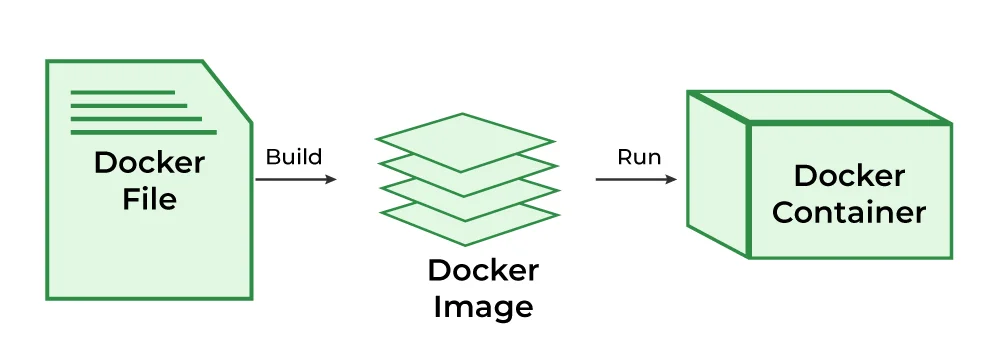
Each VM operates as if it were a completely independent physical machine, with its own operating system, applications, and configurations. This allows cloud providers to maximize hardware utilization, sharing the same physical infrastructure across thousands of customer instances while maintaining strict isolation between them. It’s how resource pooling, a key characteristic of the cloud, is achieved. For developers working with microservices, understanding containerization is also key, and a guide like What is Docker? A Beginner's Guide to Containerization can provide further insights into this related technology.
Massive Data Centers and Global Infrastructure
Cloud providers operate vast networks of data centers located around the world. These data centers are colossal physical facilities housing thousands of interconnected servers, storage devices, networking equipment, and robust power and cooling systems. These aren't just buildings full of computers; they are engineering marvels designed for maximum uptime, security, and efficiency.
Key components of cloud infrastructure include:
- Servers: Racks upon racks of powerful commodity hardware, optimized for various workloads.
- Storage Systems: Petabytes of storage devices (SSDs, HDDs, object storage arrays) for data persistence and retrieval.
- Networking: High-speed optical fiber networks, switches, and routers connecting servers within the data center and linking data centers globally. This ensures low latency and high bandwidth for data transfer.
- Redundancy: Every critical component, from power supplies to network connections, is duplicated to prevent single points of failure, ensuring high availability.
- Security: Multi-layered physical and digital security measures protect the data centers and the data within them.
These data centers are organized into "regions" (geographical areas like "US East," "Europe West") and "availability zones" (isolated locations within a region, often distinct data centers) to provide fault tolerance and disaster recovery capabilities. If one availability zone experiences an outage, workloads can failover to another within the same region, ensuring business continuity.
Abstraction and APIs
While the physical infrastructure is complex, cloud users rarely interact directly with the hardware. Instead, cloud providers offer layers of abstraction through web-based consoles, command-line interfaces (CLIs), and most importantly, Application Programming Interfaces (APIs).
- Web Console: A user-friendly graphical interface (like the AWS Management Console, Azure Portal, or GCP Console) where users can provision, monitor, and manage resources with clicks.
- CLI: Text-based tools that allow users to interact with cloud services by typing commands, ideal for scripting and automation.
- APIs: The programmatic interface that allows applications and software to communicate with cloud services. Developers can use APIs to automate the deployment, scaling, and management of cloud resources, integrating them directly into their own applications and workflows. This is crucial for DevOps practices and infrastructure-as-code.
These abstraction layers hide the underlying complexity of the physical infrastructure, allowing users to focus on building and running their applications without worrying about server provisioning, networking configurations, or storage management.
Key Cloud Service Models: IaaS, PaaS, and SaaS
Cloud computing services are typically categorized into three main service models, each offering different levels of control and management responsibilities between the cloud provider and the consumer. Understanding these models is crucial for choosing the right cloud solution for specific needs.
IaaS (Infrastructure as a Service)
What it is: IaaS provides the fundamental building blocks of cloud computing. It gives you access to virtualized computing resources—like virtual machines, storage, networks, and operating systems—but you are responsible for managing the operating system, applications, and data. The cloud provider manages the underlying infrastructure (virtualization, servers, networking, storage).
Analogy: Imagine you're building a house. With IaaS, the cloud provider gives you the land (physical data center and network), foundational utilities (power, water, internet), and the basic structural components (virtual servers, storage). You are then responsible for building the house itself (installing operating systems, databases, applications) and furnishing it.
Characteristics:
- High Flexibility and Control: You have significant control over your operating systems, applications, and configurations.
- Pay-as-you-go: Billed for resources consumed, such as CPU cycles, memory, storage, and data transfer.
- Scalability: Easily scale resources up or down as needed.
Examples:
- AWS: Amazon EC2 (Elastic Compute Cloud) for virtual servers, Amazon S3 (Simple Storage Service) for object storage, Amazon VPC (Virtual Private Cloud) for networking.
- Azure: Azure Virtual Machines, Azure Blob Storage, Azure Virtual Network.
- GCP: Google Compute Engine, Google Cloud Storage, Google Virtual Private Cloud.
Use Cases: Hosting websites, running enterprise applications, big data analysis, disaster recovery.
PaaS (Platform as a Service)
What it is: PaaS offers a complete development and deployment environment in the cloud, with all the hardware and software tools required to build and run applications. The cloud provider manages the underlying infrastructure, operating systems, and even some runtime environments (like Java, Python, Node.js), while you manage your applications and data.
Analogy: Continuing the house analogy, with PaaS, the cloud provider gives you a fully built house, complete with electricity, plumbing, and essential appliances (operating system, runtime, database). You just need to move in your furniture (your application code) and personalize the interior. You don't worry about the house's foundation or power grid.
Characteristics:
- Increased Productivity: Developers can focus solely on writing code and deploying applications, without managing infrastructure.
- Pre-configured Environments: Often includes pre-installed software stacks and development tools.
- Scalability and Availability: Provider handles scaling and ensuring high availability of the platform.
Examples:
- AWS: AWS Elastic Beanstalk, AWS Lambda (serverless computing, which is often considered an advanced form of PaaS).
- Azure: Azure App Service, Azure Functions.
- GCP: Google App Engine, Google Cloud Functions.
Use Cases: Web application development, API development, microservices, mobile backend development.
SaaS (Software as a Service)
What it is: SaaS delivers fully functional applications over the internet, typically on a subscription basis. The cloud provider manages all aspects of the application, including the software, hardware, operating system, and data. Users simply access the application via a web browser or a mobile app.
Analogy: With SaaS, the cloud provider gives you a fully furnished hotel room. You just walk in, use the amenities, and don't worry about maintaining the building, paying utility bills, or cleaning. You only pay for your stay (subscription).
Characteristics:
- Easiest to Use: No installation, setup, or infrastructure management required.
- Accessibility: Accessible from anywhere with an internet connection.
- Automatic Updates: Provider handles all software updates and patches.
Examples:
- Google Workspace (Gmail, Docs): Productivity suite accessible via web.
- Microsoft 365 (Word, Excel, Outlook): Office applications delivered as a service.
- Salesforce: Customer Relationship Management (CRM) software.
- Dropbox: File storage and sharing.
Use Cases: Email, CRM, ERP, project management, office productivity.
The choice between IaaS, PaaS, and SaaS depends on the level of control, flexibility, and management responsibility a business requires. As you move from IaaS to SaaS, the provider manages more, and the user manages less, simplifying operations but potentially reducing customization options.
Key Cloud Deployment Models: Public, Private, Hybrid, and Multicloud
Beyond service models, understanding how cloud resources are deployed is equally important. Deployment models define the location and management of the cloud infrastructure, dictating factors like security, compliance, and cost.
Public Cloud
What it is: The public cloud is the most common deployment model. Cloud resources (servers, storage, networking) are owned and operated by a third-party cloud provider and delivered over the internet. These resources are shared among multiple tenants (organizations or users), though logically isolated for security and privacy.
Characteristics:
- Shared Infrastructure: Resources are shared across many customers.
- High Scalability and Elasticity: Virtually unlimited resources are available on demand.
- Cost-Effective: Pay-as-you-go pricing eliminates upfront capital expenditure.
- Managed by Provider: The cloud provider is responsible for all maintenance and security of the underlying infrastructure.
Examples: AWS, Microsoft Azure, Google Cloud Platform.
Use Cases: Web applications, development and testing environments, non-sensitive data storage, general computing workloads.
Private Cloud
What it is: A private cloud refers to cloud computing resources used exclusively by a single organization. It can be physically located at the company's on-site data center (on-premise private cloud) or hosted by a third-party service provider. The infrastructure and services are maintained on a private network.
Characteristics:
- Exclusive Use: Dedicated resources for a single organization.
- High Security and Control: Organizations have complete control over data, security, and infrastructure.
- Compliance: Easier to meet strict regulatory and compliance requirements.
- Higher Cost: Requires significant upfront investment and ongoing maintenance from the organization.
Examples: An enterprise running its own OpenStack or VMware-based cloud in its data center.
Use Cases: Highly sensitive data, mission-critical applications, organizations with strict regulatory compliance needs (e.g., government, finance, healthcare).
Hybrid Cloud
What it is: A hybrid cloud is a combination of a public cloud and a private cloud (on-premise or hosted), connected by technology that allows data and applications to be shared between them. This model enables organizations to leverage the benefits of both environments, maintaining critical workloads on-premise while bursting less sensitive or variable workloads to the public cloud.
Characteristics:
- Flexibility: Allows organizations to choose the optimal environment for each workload.
- Workload Portability: Data and applications can move between private and public clouds.
- Cost Optimization: Use public cloud for scalable, burstable needs; private for consistent, sensitive workloads.
- Enhanced Disaster Recovery: Private data can be backed up or replicated to the public cloud.
Examples: A retail company using its private cloud for customer data and inventory management, while using the public cloud to handle seasonal spikes in e-commerce traffic.
Use Cases: Businesses with variable demand, organizations modernizing legacy applications, disaster recovery strategies.
Multicloud
What it is: Multicloud is the strategy of using multiple cloud computing services from different providers within a single architecture. This can involve using different public clouds (e.g., AWS for some services, Azure for others) or a combination of public and private clouds (which would also be a hybrid cloud scenario). The key distinction from hybrid is the explicit use of multiple distinct cloud providers.
Characteristics:
- Vendor Lock-in Avoidance: Reduces reliance on a single provider, offering more negotiation power and flexibility.
- Best-of-Breed Services: Allows organizations to choose the best services from different providers for specific needs (e.g., AWS for compute, GCP for AI/ML).
- Increased Resilience: Distributes workloads across multiple clouds, reducing the impact of an outage from a single provider.
- Complexity: Managing resources across multiple clouds can be complex and requires specialized tools and expertise.
Examples: A company using AWS for its primary web applications, Azure for its identity management and Office 365, and GCP for its advanced machine learning workloads.
Use Cases: Enterprises seeking maximum flexibility, resilience, and specialized services, organizations with diverse application portfolios.
Understanding AWS, Azure, and GCP Basics: The Big Three Cloud Providers
The public cloud market is dominated by three major players, often referred to as "the Big Three." Each offers a comprehensive suite of services but has distinct strengths, historical contexts, and areas of focus. Understanding their fundamental characteristics is key to navigating the cloud ecosystem.
AWS (Amazon Web Services)
Overview: Launched in 2006, AWS is the pioneer and undisputed market leader in cloud computing. It began by offering infrastructure services derived from Amazon.com's internal infrastructure needs and has since grown into a behemoth with the broadest and deepest set of services.
Key Strengths:
- Market Leadership & Maturity: With a substantial head start, AWS has the largest market share (around 31-33% as of Q4 2023, according to Synergy Research Group and Canalys). Its services are mature, well-documented, and have a massive ecosystem of partners and community support.
- Breadth and Depth of Services: AWS offers an unparalleled range of services across compute, storage, databases, networking, analytics, machine learning, IoT, security, and more. From basic virtual machines (EC2) to serverless functions (Lambda), fully managed databases (RDS, DynamoDB), and specialized AI services (SageMaker, Rekognition), it covers virtually every IT need.
- Innovation: Despite its size, AWS continues to innovate rapidly, regularly releasing new services and features.
- Global Reach: With more regions and availability zones than any other provider, AWS offers extensive global coverage, enabling low-latency access worldwide.
Core Services:
- Compute: Amazon EC2 (virtual servers), AWS Lambda (serverless functions), Amazon ECS/EKS (container orchestration).
- Storage: Amazon S3 (object storage), Amazon EBS (block storage for EC2), Amazon Glacier (archival storage).
- Databases: Amazon RDS (managed relational databases), Amazon DynamoDB (NoSQL database), Amazon Aurora (cloud-native relational database).
- Networking: Amazon VPC (virtual networks), Amazon Route 53 (DNS).
- Machine Learning: Amazon SageMaker, Amazon Rekognition, Amazon Comprehend.
Typical Use Cases: Enterprises of all sizes, startups, large-scale web applications, big data analytics, AI/ML initiatives, IoT platforms.
Microsoft Azure
Overview: Launched in 2010, Microsoft Azure leverages Microsoft's vast enterprise customer base and strong hybrid cloud capabilities. It has rapidly grown to be the second-largest cloud provider, appealing significantly to organizations already heavily invested in Microsoft technologies.
Key Strengths:
- Hybrid Cloud Excellence: Azure offers superior integration with on-premise Microsoft products like Windows Server, SQL Server, Active Directory, and System Center through services like Azure Arc and Azure Stack. This is a huge draw for enterprises undergoing digital transformation.
- Enterprise Focus: Strong compliance certifications and enterprise-grade security features make it attractive to large organizations, especially those in regulated industries.
- PaaS Offerings: Azure provides robust PaaS services like Azure App Service and Azure Functions, making it easy for developers to deploy applications without managing underlying infrastructure.
- Identity Management: Seamless integration with Azure Active Directory (Azure AD), a widely used enterprise identity service.
Core Services:
- Compute: Azure Virtual Machines, Azure App Service, Azure Functions, Azure Kubernetes Service (AKS).
- Storage: Azure Blob Storage, Azure Disk Storage, Azure Files.
- Databases: Azure SQL Database, Azure Cosmos DB (NoSQL), Azure Database for PostgreSQL/MySQL.
- Networking: Azure Virtual Network, Azure DNS, Azure Load Balancer.
- Machine Learning: Azure Machine Learning, Cognitive Services.
Typical Use Cases: Large enterprises, organizations with significant Microsoft IT investments, hybrid cloud strategies, government agencies, PaaS-centric development.
Google Cloud Platform (GCP)
Overview: GCP, officially launched in 2008 but gaining significant momentum in the mid-2010s, leverages Google's immense global infrastructure and its expertise in data analytics, artificial intelligence, and open-source technologies. While third in market share, it is a formidable competitor known for its innovation in specific areas.
Key Strengths:
- Data Analytics and AI/ML Prowess: GCP excels in big data analytics (BigQuery, Dataflow) and machine learning (TensorFlow integration, AI Platform, Vertex AI). Many of Google's internal AI tools are made available on GCP.
- Kubernetes Originator: Google invented Kubernetes, the leading container orchestration platform. GCP offers a highly integrated and managed Kubernetes service (GKE - Google Kubernetes Engine) that is often considered best-in-class.
- Global Network Infrastructure: GCP runs on the same global network that powers Google's search engine and YouTube, offering extremely low latency and high performance.
- Open Source Commitment: Strong support for open-source technologies, reflected in its services and community contributions.
- Pricing Model: Often competitive, with minute-level billing and sustained use discounts.
Core Services:
- Compute: Google Compute Engine (virtual machines), Google App Engine (PaaS), Google Cloud Functions (serverless), Google Kubernetes Engine (GKE).
- Storage: Google Cloud Storage (object storage), Persistent Disk (block storage for Compute Engine).
- Databases: Cloud SQL (managed relational databases), Cloud Spanner (horizontally scalable relational database), Firestore (NoSQL).
- Networking: Google Cloud VPC, Cloud DNS.
- Machine Learning: Vertex AI, TensorFlow Enterprise, Vision AI, Natural Language AI.
Typical Use Cases: Data-intensive workloads, AI/ML development, cloud-native startups, organizations heavily invested in open-source and Kubernetes, high-performance computing.
While each of the Big Three offers similar foundational services, their unique strengths often guide an organization's initial choice or multicloud strategy. AWS is the generalist powerhouse, Azure is the enterprise and hybrid champion, and GCP is the data, AI, and open-source innovator.
Real-World Applications of Cloud Computing
The transformative impact of cloud computing extends across virtually every industry and business function. Its ability to provide scalable, flexible, and cost-effective IT resources has enabled innovations that would have been impossible or prohibitively expensive a decade ago.
Web Hosting and E-commerce
Cloud computing revolutionized how websites and e-commerce platforms are built and scaled. Companies no longer need to provision dedicated servers anticipating peak traffic. Instead, they can dynamically scale resources up during sales events (like Black Friday) and scale down afterward, paying only for the capacity used.
- Netflix: One of the most famous cloud success stories, Netflix runs almost entirely on AWS. Its massive streaming infrastructure, handling petabytes of data and billions of requests daily, leverages AWS's global reach, scalability, and diverse service offerings to deliver content seamlessly to millions of subscribers worldwide.
- Airbnb: This global accommodation platform uses AWS to host its dynamic marketplace, managing millions of listings and bookings with high availability and resilience.
Big Data Analytics and AI/ML
The cloud provides the immense computational power and storage necessary to process, analyze, and derive insights from massive datasets, fueling advancements in artificial intelligence and machine learning. For an in-depth look at these foundational technologies, exploring resources like Neural Networks Explained: From Perceptron to Deep Learning can provide valuable context.
- Genomic Sequencing: Researchers can use cloud infrastructure to process vast amounts of genetic data, accelerating discoveries in medicine and biotechnology. Cloud providers offer specialized services and powerful GPUs for these computationally intensive tasks.
- Predictive Maintenance: Manufacturers use cloud-based AI to analyze sensor data from industrial machinery. This allows them to predict equipment failures before they occur, enabling proactive maintenance and reducing costly downtime.
- Financial Fraud Detection: Banks and financial institutions employ cloud-based machine learning models to analyze transaction patterns in real-time, identifying and flagging suspicious activities to prevent fraud.
Disaster Recovery and Backup
Moving disaster recovery and data backup to the cloud significantly reduces the cost and complexity compared to maintaining a secondary physical data center. Cloud storage is highly durable and globally replicated, offering robust protection for critical data.
- Hybrid Cloud DR: Many enterprises use a hybrid approach, keeping their primary production environment on-premise but replicating data and spinning up recovery servers in the public cloud only when a disaster strikes. This "pay for what you use" model makes DR far more affordable and flexible.
Internet of Things (IoT) and Edge Computing
The cloud acts as the central hub for collecting, processing, and analyzing data from billions of IoT devices worldwide. As IoT grows, edge computing—processing data closer to the source (the "edge" of the network)—is also gaining prominence, often integrated with cloud platforms.
- Smart Cities: Cloud platforms collect and analyze data from sensors in traffic lights, public transportation, and environmental monitors to optimize urban planning, reduce congestion, and improve public services.
- Connected Cars: Automotive manufacturers use cloud services to collect telematics data, enable over-the-air updates, and power in-car infotainment systems.
Software Development and Testing
Cloud environments offer unparalleled agility for developers. They can quickly provision entire development and testing environments, run automated tests at scale, and tear down resources when no longer needed, accelerating the software development lifecycle.
- CI/CD Pipelines: Continuous Integration/Continuous Deployment (CI/CD) pipelines leverage cloud services to automate the build, test, and deployment of software, significantly speeding up release cycles and improving code quality.
- DevOps Adoption: The elasticity and programmability of cloud resources are fundamental to modern DevOps practices, enabling infrastructure-as-code and automated operations.
These examples merely scratch the surface of how cloud computing is reshaping industries. From healthcare to entertainment, education to manufacturing, the cloud provides the essential digital foundation for innovation and efficiency.
Advantages and Challenges of Cloud Adoption
While the benefits of cloud computing are profound, organizations must also be aware of the potential challenges and complexities involved in adopting and managing cloud environments. A balanced understanding is crucial for a successful cloud strategy.
Advantages of Cloud Adoption
-
Cost Efficiency:
- Reduced Capital Expenditure (CapEx): Eliminates the need for expensive upfront purchases of hardware, software, and data center facilities.
- Operational Expenditure (OpEx): Shifts costs to a pay-as-you-go model, paying only for the resources consumed. This often leads to significant savings, especially for variable workloads.
- Economy of Scale: Cloud providers buy and operate hardware at massive scales, passing on cost benefits to customers.
-
Scalability and Elasticity:
- On-Demand Resources: Resources can be provisioned and de-provisioned rapidly, allowing businesses to handle sudden spikes or dips in demand without over-provisioning or experiencing performance degradation.
- Global Reach: Easily deploy applications and data globally, reaching customers in diverse geographical locations with low latency.
-
Increased Flexibility and Agility:
- Rapid Deployment: Deploy new applications and services in minutes, not weeks or months.
- Experimentation: Lowers the cost of failure, encouraging innovation and experimentation with new technologies.
- Focus on Core Business: Offloads IT infrastructure management, allowing businesses to focus on their core competencies and strategic initiatives.
-
Reliability and High Availability:
- Redundancy: Cloud providers build their infrastructure with extensive redundancy across regions and availability zones, offering high availability and resilience against hardware failures or outages.
- Disaster Recovery: Cloud services make it easier and more affordable to implement robust disaster recovery and backup strategies.
-
Enhanced Security:
- Shared Responsibility Model: While customers are responsible for security in the cloud (e.g., configuring firewalls, securing applications), cloud providers are responsible for security of the cloud (physical security of data centers, network infrastructure, hypervisor).
- Expertise: Cloud providers invest heavily in security personnel and advanced technologies, often surpassing what individual companies can afford.
-
Automatic Updates and Maintenance:
- Cloud providers handle patching, updates, and maintenance of the underlying infrastructure, reducing the operational burden on customers.
Challenges of Cloud Adoption
-
Security Concerns:
- Data Sovereignty: Concerns about where data is physically stored and whose laws apply to it.
- Compliance: Meeting specific industry (e.g., HIPAA, PCI DSS) or regional (e.g., GDPR) compliance requirements in a shared environment can be complex.
- Misconfiguration: The most common cloud security breaches stem from customer misconfigurations (e.g., improperly secured storage buckets).
-
Vendor Lock-in:
- Proprietary Technologies: Reliance on a specific cloud provider's proprietary services can make it difficult and costly to migrate to another provider later.
- Interoperability: Integrating services from different cloud providers in a multicloud strategy can add complexity.
-
Cost Management and Optimization (FinOps):
- Hidden Costs: While pay-as-you-go is cost-efficient, unmonitored usage, forgotten resources, or inefficient resource allocation can lead to unexpectedly high bills.
- Complexity of Pricing Models: Cloud pricing can be intricate, with numerous factors influencing costs (data egress, API calls, specialized services). Effective cost management requires dedicated FinOps practices.
-
Performance and Latency:
- Network Dependence: Performance is highly dependent on network connectivity to the cloud. Applications requiring extremely low latency might be better suited for edge computing or on-premise solutions.
- Data Egress Fees: Cloud providers typically charge for data transferred out of their network, which can become a significant cost for data-intensive applications.
-
Lack of Control and Visibility:
- Black Box Effect: Customers have less direct control over the underlying physical infrastructure and sometimes less visibility into specific operational details compared to an on-premise setup.
- Service Outages: While rare, widespread cloud provider outages can impact numerous customers simultaneously.
-
Staffing and Skill Gaps:
- Migrating to and managing cloud environments requires specialized skills that IT teams may not possess, necessitating training or hiring new talent.
Careful planning, robust governance, strong security practices, and continuous cost monitoring are essential for organizations to maximize the advantages of cloud computing while mitigating its inherent challenges.
The Future Outlook for Cloud Computing
The evolution of cloud computing is far from over. It continues to be a dynamic field, constantly integrating new technologies and responding to emerging business needs. Several key trends are shaping its future trajectory.
Convergence with Edge Computing
As the Internet of Things (IoT) proliferates, generating massive amounts of data at the "edge" (devices, sensors, local data centers), the cloud is increasingly working in tandem with edge computing. Instead of sending all data to a centralized cloud for processing, some computations will occur closer to the data source to reduce latency, conserve bandwidth, and enable real-time responses. The cloud will then serve as the central repository for aggregated data, long-term analytics, and AI model training, while edge devices handle immediate operational tasks. This synergy promises more efficient and responsive distributed systems.
Continued Growth of Serverless Computing
Serverless computing (e.g., AWS Lambda, Azure Functions, Google Cloud Functions) will continue its rapid ascent. By completely abstracting away server management, serverless allows developers to focus purely on code, paying only for the exact compute duration of their functions. This model inherently scales with demand and offers compelling cost advantages for event-driven architectures and microservices. The future will likely see more complex applications built entirely on serverless principles, moving beyond simple functions to more sophisticated, integrated platforms.
Deeper AI and Machine Learning Integration
Cloud providers are heavily investing in AI and ML services, making sophisticated capabilities accessible to a broader audience. The future will see even deeper integration of AI/ML across all cloud services, from intelligent data management and automated security to proactive resource optimization. AI will become an embedded layer within the cloud infrastructure, assisting with everything from forecasting workloads to automating troubleshooting. Generative AI, in particular, will drive demand for specialized compute resources and new cloud services. For more on the cutting edge of AI development, our article GPT-5.4 & AI Avalanche: March's Major Milestones Reshape Tech offers further insights.
Focus on Sustainability and Green Cloud
As awareness of environmental impact grows, cloud providers are under increasing pressure to demonstrate sustainable practices. The future of cloud computing will involve greater transparency on carbon footprints, increased use of renewable energy sources in data centers, and more energy-efficient hardware and software designs. Innovations like liquid cooling and AI-driven data center optimization will become standard, contributing to a "green cloud" that aligns with global sustainability goals.
Hybrid and Multicloud Optimization
While hybrid and multicloud strategies are already prevalent, their management and optimization will become more sophisticated. Tools and platforms for seamless workload migration, consistent policy enforcement, and unified visibility across disparate cloud environments will be critical. The focus will shift from simply using multiple clouds to effectively orchestrating them for optimal performance, cost, and resilience, without introducing unnecessary complexity.
Democratization of Advanced Technologies
Cloud computing has always been about making powerful IT resources accessible. This trend will continue, with the cloud further democratizing access to cutting-edge technologies like quantum computing and advanced robotics platforms. Instead of requiring specialized hardware and expertise, these capabilities will be offered as managed services, enabling smaller organizations and individual developers to experiment and innovate in previously inaccessible domains.
The future of cloud computing is one of increasing sophistication, integration, and intelligence. It will continue to be the backbone of digital transformation, constantly evolving to meet the demands of an increasingly connected and data-driven world.
Conclusion: The Indispensable Foundation of Modern Tech
Cloud computing has fundamentally reshaped the technological landscape, moving from a niche concept to the indispensable foundation upon which most modern digital services are built. Its core promise of on-demand, scalable, and cost-effective IT resources has proven revolutionary, empowering businesses of all sizes to innovate with unprecedented speed and agility. From the fundamental principles of virtualization and resource pooling to the distinct offerings of the major players like AWS, Azure, and GCP, the cloud represents a paradigm shift that continues to drive global technological progress.
The move from managing physical servers to consuming IT as a utility has unlocked immense potential, enabling everything from real-time global streaming to sophisticated AI-driven analytics. Organizations now have the flexibility to choose between Infrastructure as a Service (IaaS), Platform as a Service (PaaS), and Software as a Service (SaaS) models, tailoring their approach to their specific control, management, and development needs. Furthermore, deployment models—public, private, hybrid, and multicloud—offer strategic flexibility, allowing businesses to optimize for security, compliance, performance, and cost.
While challenges like cost optimization, security management, and vendor lock-in remain, the industry is continually evolving to address these concerns, fostering best practices like FinOps and enhancing governance tools. Looking ahead, the cloud's future is intertwined with cutting-edge advancements such as edge computing, serverless architectures, and even deeper integration of artificial intelligence, promising an even more intelligent, sustainable, and interconnected digital future. Understanding What is Cloud Computing? AWS, Azure, GCP Basics is not just about comprehending a technology; it’s about grasping the core engine driving innovation in the 21st century.
Frequently Asked Questions
Q: What are the main types of cloud computing?
A: Cloud computing primarily offers three service models: Infrastructure as a Service (IaaS), Platform as a Service (PaaS), and Software as a Service (SaaS). These models define the level of control and management shared between the cloud provider and the user.
Q: What is the difference between public, private, and hybrid clouds?
A: Public clouds are shared and managed by third-party providers over the internet. Private clouds are dedicated to a single organization, either on-premise or hosted. Hybrid clouds combine both public and private environments, allowing workloads to move between them.
Q: Who are the "Big Three" cloud providers?
A: The "Big Three" dominant cloud providers are Amazon Web Services (AWS), Microsoft Azure, and Google Cloud Platform (GCP). Each offers a comprehensive suite of services with distinct strengths.