Mastering Web Development: A Guide to the Free Analytics Drive Live HTML Editor
Introduction: The Power of Instant Feedback
In the fast-paced world of web development, staying productive means minimizing the "feedback loop"—the time between writing a line of code and seeing its result. For many developers, the Analytics Drive Live HTML CSS JS Compiler & Editor is the perfect solution for creating a seamless coding workflow. By providing a seamless coding experience, we aim to help developers transition from ideas to reality faster than ever before.
Why Use an Online Live Editor?
Traditional development involves setting up a local server, managing file structures, and constant manual refreshes. While this is necessary for complex projects, it is overkill for quick prototyping, learning, or debugging small snippets. Our approach to automating web development workflows emphasizes simplicity and speed.
Our online editor offers several key advantages:
1. Zero Setup Required
You don't need to install VS Code, Node.js, or any extensions. Simply navigate to htmleditor.analyticsdrive.tech and start coding immediately. It is perfect for developers on the go, students in computer labs, or anyone testing ideas on a laptop they don't own.
2. Real-Time Live Preview
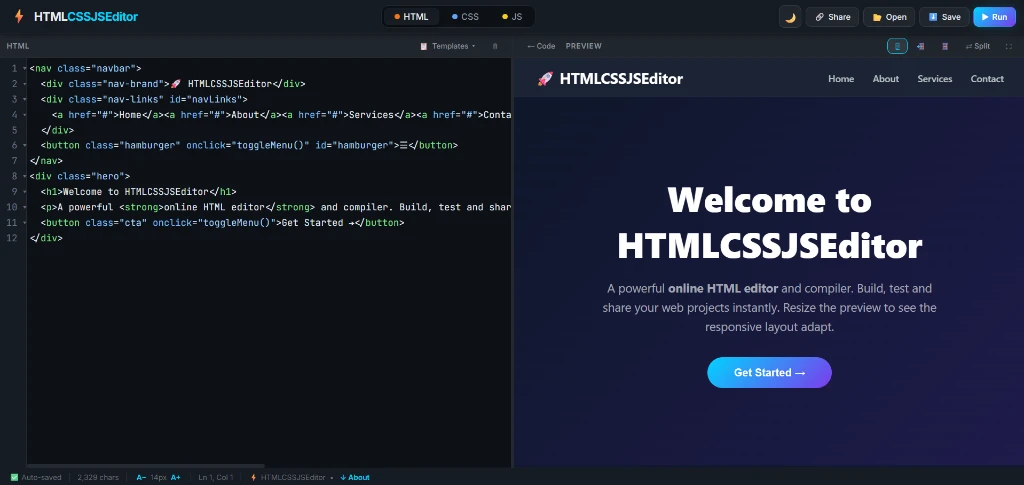
As you type your HTML and CSS, the results appear instantly in the preview pane. This immediate visual feedback is crucial for: - Fine-tuning CSS animations and layouts. - Testing typography and color combinations. - Learning how different HTML tags interact with each other.
This prevents the common frustration of technical debt, which we've discussed in our software engineering guides.
3. Mobile-Responsive by Design
The editor itself is fully responsive. Whether you are coding on a tablet or checking a quick snippet on your phone, the interface adapts to your screen size. Furthermore, you can test how your code renders on different screen widths right inside the preview window. This reflects modern responsive font size guidelines used by top designers.
Key Features of the Analytics Drive Editor
Our editor isn't just a simple text box. It includes professional-grade features to help you work faster:
- Triple-Pane Layout: Dedicated sections for HTML, CSS, and JavaScript keep your code organized.
- Persistent Code: The editor uses local storage, meaning your work is saved automatically in your browser. If you accidentally close the tab, your code will be there when you return.
- Clean, Minimalist UI: No distracting ads or unnecessary toolbars. Focus entirely on your code.
- Dark Mode Support: A sleek, high-contrast dark theme that is easy on the eyes during long coding sessions.
Getting Started: A Quick Tutorial
To see the power of the Analytics Drive editor, try pasting this simple snippet into the boxes:
HTML:
<div class="card">
  <h1>Hello, Analytics Drive!</h1>
  <p>Start your coding journey here.</p>
  <button id="btn">Click Me!</button>
</div>
CSS:
body {
  background: #f0f2f5;
  display: flex;
  justify-content: center;
  align-items: center;
  height: 50vh;
}
.card {
  background: white;
  padding: 2rem;
  border-radius: 12px;
  box-shadow: 0 10px 30px rgba(0,0,0,0.1);
  text-align: center;
}
button {
  background: #005b96;
  color: white;
  border: none;
  padding: 0.5rem 1.5rem;
  border-radius: 5px;
  cursor: pointer;
  margin-top: 1rem;
}
JavaScript:
document.getElementById('btn').addEventListener('click', () => {
  alert('Welcome to the future of web development!');
});
The moment you finish pasting, you will see a beautifully styled card. Click the button, and the alert will trigger—no "Run" button or "Refresh" needed. This is as close as you can get to real-time light control in code.
Building Topical Authority in Web Dev
At Analytics Drive, our goal is to empower developers with tools and knowledge. By providing a free compiler, we are helping a new generation of coders bridge the gap between theory and practice.
Whether you are a student preparing for a coding interview, a designer testing a landing page layout, or a pro developer debugging a tricky CSS Grid issue, our editor is your new best friend.
Conclusion
The Analytics Drive Live HTML CSS JS Editor is more than just a tool; it is a sandbox for innovation. We invite you to try it out today at htmleditor.analyticsdrive.tech and experience the speed of real-time development.
Stay tuned for more updates as we continue to add features like one-click code sharing and expanded library support!
Frequently Asked Questions
Q: What is the Analytics Drive Live HTML Editor?
A: It is a free, browser-based tool that allows you to write HTML, CSS, and JavaScript with an instant live preview, perfect for prototyping and learning.
Q: Is it free to use?
A: Yes, the editor is 100% free, requires no login, and works entirely in your browser using local storage to save your progress.
Q: Does it support mobile devices?
A: Yes, the editor is fully responsive and allows you to test how your code looks on different screen sizes using the built-in mobile preview mode.